I passed Phase 1 of The5ers High Stakes $100,000 evaluation by running my QuantMonitor strategy on my own broker and copying every trade to the prop account using the FX Blue Personal Trade Copier. The account closed Phase 1 above target, the evaluation was approved, and Phase 2 is now live. This article walks through the exact setup that made it work — and the one rule-compliance lesson that made the difference between “profitable” and “passed.”
Phase 1 results — at a glance
| Metric | Value |
|---|---|
| Starting balance | $100,000.00 |
| Closing equity | $110,802.47 |
| Recognized profit (counts toward target) | $8,066.66 |
| Phase 1 target | $105,000 — passed ✅ |
| Outcome | Promoted to Phase 2 (new target $105,000) |
Two numbers matter here. The account made more than 10% in real equity. The recognized profit was lower than the real profit because of news-window rules — and that gap is the most important lesson in this whole write-up. More on that below.
What is the FX Blue Personal Trade Copier?
FX Blue Personal Trade Copier is a free MT4/MT5 expert advisor that mirrors orders from a source account to one or more target accounts in near real time. It has two components:
- Sender EA — installed on the source account, broadcasts every open, close, and modification to a named channel.
- Receiver EA — installed on the target account, listens to that channel and translates each signal into a local order.
The data flow is linear:
Strategy → Sender EA → Channel → Receiver EA → Target account
That is the entire architecture. Everything else in this article is configuration — and configuration is where the pass/fail lives.
2 setups that cover 95% of real-world copying
Across every account I run, copying boils down to two distinct setups. They require very different parameters because they solve very different problems.
Setup 1 — Same broker, same symbols (channel robo1)
Same broker = identical symbol names, identical price feed, identical contract specs. Nothing to translate, so the copier stays literal.
| Parameter | Value | Why |
|---|---|---|
IncludePendingOrders | true | Pending orders survive the trip |
HideSLandTP | false | SL/TP travel with the trade |
LotSizeMultiplier | 1.0 | Direct 1:1 lot transfer |
MirrorSLandTPChanges | true | Trailing edits replicate |
AllowSlippagePips | 1000 | Generous but bounded |
CustomSymbolMappings | empty | Nothing to map |
Use this whenever the destination is your own second account at the same broker.
Setup 2 — Different broker / prop firm (channel fivers1)
This is the setup that passed The5ers. Different broker = different symbol names, different price feed, different rules. The job changes from clone the trade to transfer the market exposure.
Symbol mapping is the first thing to get right:
.USTECHCash = NAS100
.US30Cash   = US30
.DE40Cash   = DAX40
BRENT       = XBRUSD
Then the Receiver parameters:
| Parameter | Value | Why |
|---|---|---|
TradeAllOrdersAtMarket | true | Pending levels are meaningless on a different feed |
AllowSlippagePips | 9,999,999 | Let the fill happen — the strategy needs the exposure, not the pip |
PlaceLimitOrderIfSlipped | false | Market only, never a stranded limit |
UseRiskFactor | 0.2 | Conservative risk scaling onto a prop account |
LotSizeMultiplier | 0.0 | Size is driven by the risk factor, not by raw lots |
MirrorSLandTPChanges | false | SL/TP edits on a different feed cause more problems than they solve |
IncludePendingOrders (sender) | false | Pending orders are not broadcast |
The principle that made this setup pass: stop trying to clone the price; copy the direction and the risk.
Why the recognized profit was lower than the real profit
The account passed — but only $8,066.66 of the $10,802.47 real gain counted. Here is exactly why.
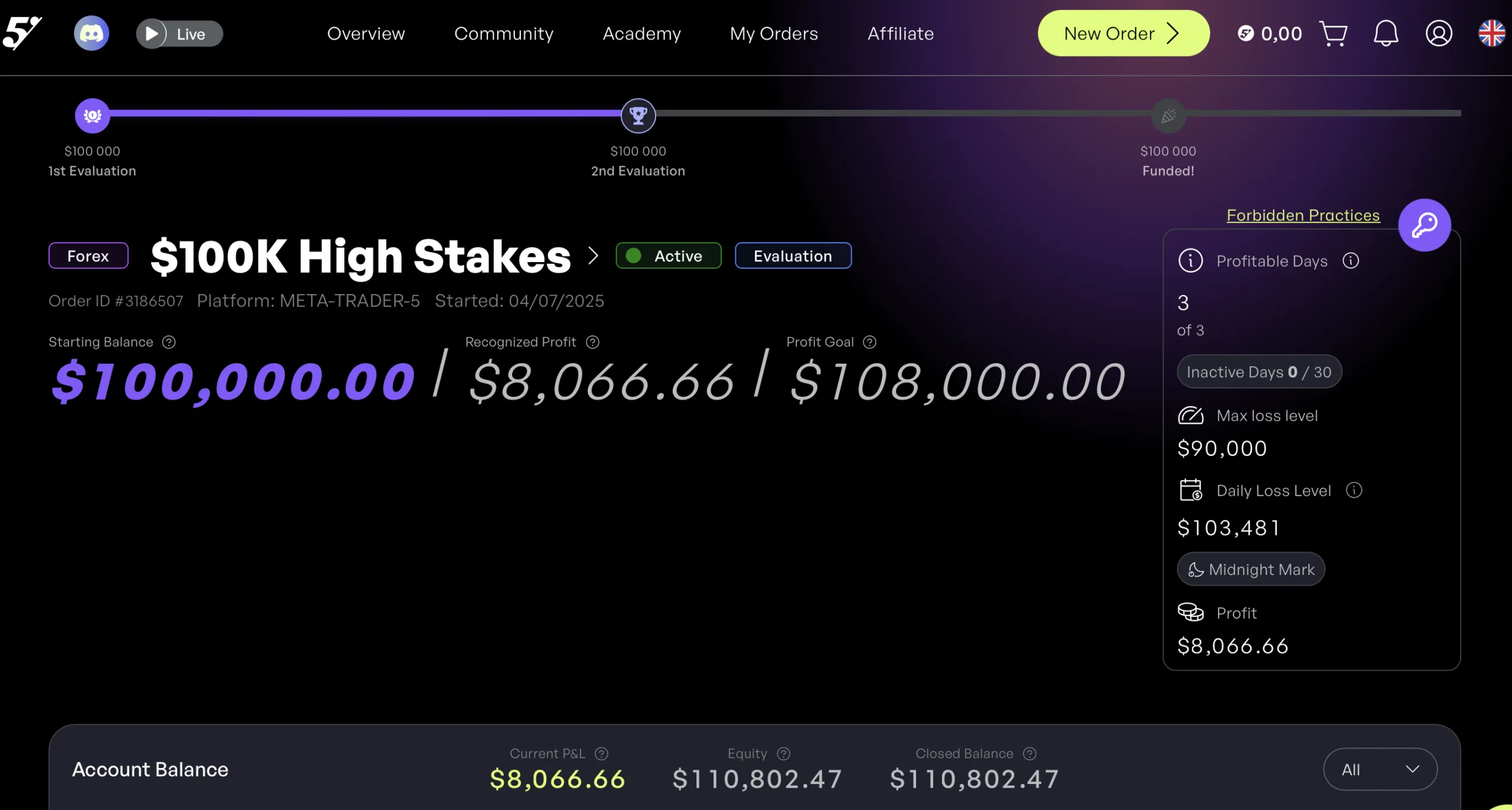
Screenshot 1 — The5ers Phase 1: actual balance, recognized profit and profit target. The account reached $110,802.47, while the recognized profit was $8,066.66. Phase 1 was passed.
Reason 1 — News-window restrictions
Some trades opened inside a high-impact news window. The copier copied them. The broker filled them. The5ers’ rules excluded the resulting profit from the evaluation target.
Reason 2 — Profit during restricted windows is not symmetrical
The platform counts losses but does not count profits from any trade that violates a window rule. That asymmetry matters: a news-time win is not “neutral” — it actively bends the evaluation curve in the wrong direction.
Reason 3 — A working copier is not automatically a passing copier
The copier executed faithfully. That is not the same thing as passing the evaluation. The real system has five layers, not three:
Strategy + Copier + Broker mapping + Risk scaling + Rule compliance
Drop one, the result drops with it. I passed Phase 1 with the first four solid; Phase 2 is about cleaning up the fifth.
4 changes I’m making in Phase 2
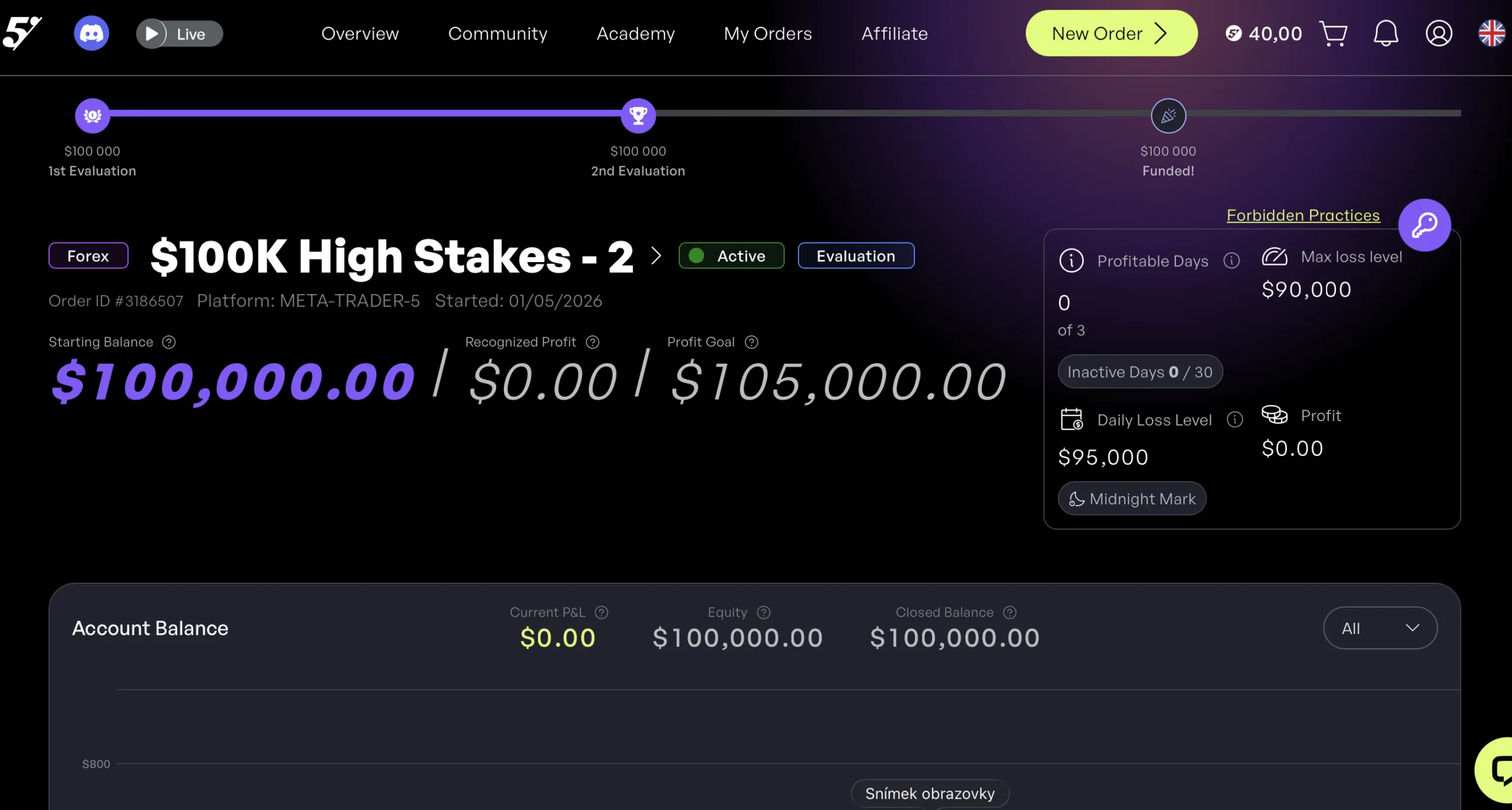
Screenshot 2 — The5ers Phase 2: new evaluation stage started. After passing Phase 1, the second phase begins from $100,000 with a fresh target of $105,000 and recognized profit reset to $0.00.
- News filtering at the strategy level, not at the copier level. The economic calendar is now an input to the entry logic, so trades during restricted windows never get sent in the first place.
- Daily review of the copier logs — heartbeat, rejected trades, slippage. Five minutes per session.
- Two parallel monitoring layers: one tracks whether the strategy is making money; the other tracks whether every trade was rules-compliant. These are not the same question.
- Risk factor stays at 0.2. Phase 1 proved the scaling works. Adding leverage to chase a target is exactly the mistake the prop firm is designed to catch.
Operational checklist before copying to a prop account
Run through this list before you pay an evaluation fee. It is much cheaper than failing one.
Platform rules
- Are EAs and copiers explicitly permitted?
- Is written approval required?
- Are news trades restricted? Is profit during news counted? Is loss during news counted?
Technical setup
- Do symbol names match exactly? Indexes and commodities are where this breaks.
- Is
CustomSymbolMappingscorrect end-to-end? - Is the VPS stable, with exactly one Sender and one Receiver on the channel?
Risk and monitoring
- Is the risk factor conservative enough that one bad day cannot blow the daily-loss limit?
- Is the heartbeat visible?
- Are rejected trades surfaced where you’ll see them?
- Is the economic calendar wired into the strategy?
The rule that matters more than any parameter
If there is one thing to take from this Phase 1 pass, it is this: do not build execution around the broker you’re copying from. Build it around the rules of the platform you’re copying to.
Rules trade your account, not your feelings. The copier doesn’t care that the strategy was profitable. The prop firm doesn’t care that the trade made money — it cares that the trade was inside the rules. Engineer the system around the constraints that will actually decide whether you pass.
I passed Phase 1 because the strategy had a real edge and the copier transferred it cleanly. Phase 2 is about closing the last gap — making sure every single trade that travels through the copier also passes the rule check on the other end.
Next steps
- Download the working sender + receiver config used for both setups above: sender-receiver set.
- Read the FX Blue documentation: FX Blue Personal Trade Copier.
- Read the current The5ers rules before any evaluation: help.the5ers.com.
- Phase 2 results will be posted as a follow-up — subscribe to QuantMonitor updates if you want to see how it ends.
Your move: put a real strategy on a prop account
Here's the challenge: take a strategy with a genuine edge, copy it onto a prop evaluation the way I copied mine onto The5ers with FX Blue, and build the one thing that actually decides pass or fail — rule-compliant execution. The strategy is only half the job; the copier setup and the platform rules are the rest.
The next funded account is a disciplined setup away. Take the step.