To monitor your trading VPS uptime, install a lightweight agent in your platform that sends a regular heartbeat to a monitoring service (like Cronitor) and alerts you the moment the heartbeat stops — meaning your VPS, terminal or EA went down. This “dead man’s switch” approach catches silent failures that a normal login never reveals, so your strategies never keep running blind while you assume everything is fine.
Trading VPS uptime monitoring at a glance
| Question | Short answer |
|---|---|
| What monitors uptime? | A small agent inside your trading platform that emits a periodic heartbeat. |
| Who receives the heartbeat? | An external service such as Cronitor, running separately from your VPS. |
| When do you get alerted? | The instant a scheduled heartbeat fails to arrive (VPS, terminal or EA down). |
| Which platforms? | MetaTrader 4 and MetaTrader 5 (standalone agent). |
| QuantMonitor’s agent cost? | Offered as a free utility (free access, up to 5 MetaTrader terminals). |
Why does VPS and EA uptime monitoring matter?
Algorithmic strategies fail silently. A VPS can reboot after a Windows update, a broker can drop your connection, a terminal can crash, or an Expert Advisor can be disabled or detached — and nothing tells you. Your equity curve simply stops updating while you assume orders are still firing.
The danger is that the failure is invisible until you happen to log in. By then you may have missed entries, left positions unmanaged, or run without a stop for hours. Uptime monitoring turns a silent outage into an immediate alert, so a five-minute fix never becomes a blown account.
What silently stops a trading strategy?
- VPS reboot — an automatic Windows update or provider maintenance restarts the machine and the terminal doesn’t relaunch.
- Broker disconnect — the terminal stays open but loses its connection to the trade server.
- Terminal crash — MetaTrader closes unexpectedly.
- EA disabled or removed — AutoTrading is toggled off, the chart is closed, or the EA hits an error and stops.
- Expired VPS or subscription — the instance is suspended for non-payment without warning.
How does uptime monitoring work (agent + Cronitor heartbeat)?
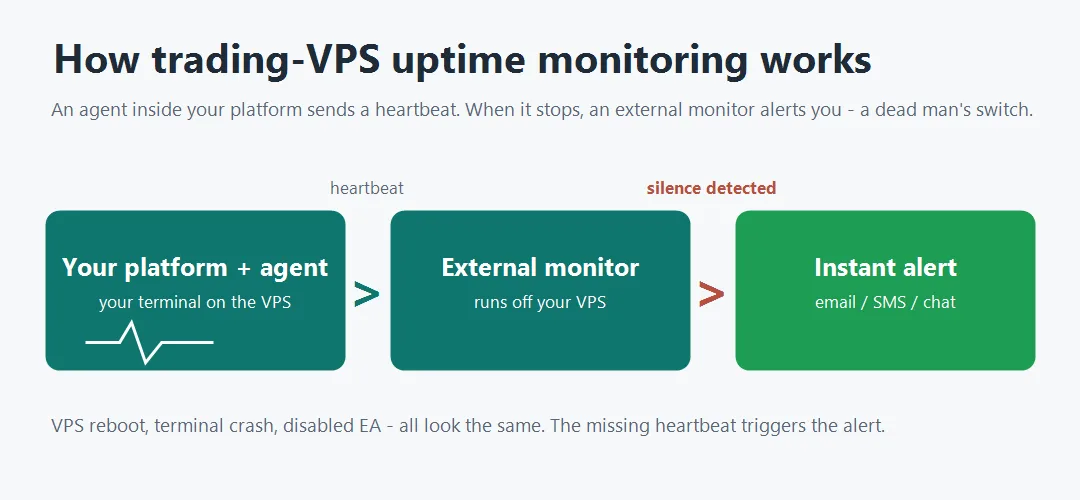
A heartbeat monitor is the inverse of a normal website check. Instead of an outside server pinging your machine, an agent inside your trading platform sends a regular “I’m alive” ping out to a monitoring service. As long as those pings arrive on schedule, the service stays quiet.
The alert fires when a ping is missing. This is the “dead man’s switch”: the monitor expects a heartbeat every interval, and if none arrives within a short grace period, it concludes the source is down and notifies you. Because the check runs on external infrastructure (like Cronitor), it keeps working even when your VPS is the thing that died — a self-hosted checker on the same VPS would go dark with it.
How to set up trading VPS uptime monitoring (step by step)
- Create a heartbeat monitor in Cronitor. In your Cronitor account, add a new heartbeat monitor and copy its unique ping URL — this is the address your agent will call on a schedule.
- Install the QuantMonitor agent in MetaTrader. Download the agent for your platform (MetaTrader 4 or MetaTrader 5) from the install page, open MetaTrader’s data folder (File > Open Data Folder), drop the agent into
MQL4/MQL5 > Experts, and refresh the Navigator. - Allow the Cronitor URL in MetaTrader. Go to Tools > Options > Expert Advisors, tick Allow WebRequest for listed URL and add your Cronitor ping URL. Without this, MetaTrader blocks the agent’s outbound call and no heartbeat can leave the terminal.
- Attach the agent and paste your Cronitor URL. Drag the agent onto any chart and, in its inputs, paste your Cronitor ping URL. With AutoTrading on, the agent now pings that URL on a schedule — that steady ping is your heartbeat.
- Set the alert in Cronitor. Choose the grace period (how long a missed ping is tolerated) and your alert channel — email, SMS or a chat/mobile notification — so a missing heartbeat reaches you.
- Test a real outage. Stop the agent or close the terminal and confirm Cronitor actually sends the down alert before you rely on it in production.
Prefer to follow along? The 3-minute video above walks the exact clicks; the written stages here are the map. Grab the agent and the full setup on the monitoring page and its install guide.
Frequently asked questions
How do I know if my MT4/MT5 stopped trading?
Install a monitoring agent that sends a heartbeat from inside the terminal to an external service; if the terminal, EA or VPS goes down, the heartbeat stops and you get an alert within minutes. Relying on manually logging in or on broker fill emails will not tell you when the platform has gone silent.
What is a dead man’s switch for trading?
A dead man’s switch is a monitor that alerts you when an expected signal stops rather than when an event happens. For trading, your platform sends a regular heartbeat and the monitoring service alerts you the moment a heartbeat is missing — so an outage itself is what triggers the notification.
How does the agent send its heartbeat?
The agent is an Expert Advisor you attach to a chart in MetaTrader 4 or 5. On a schedule it calls your Cronitor ping URL using MetaTrader’s WebRequest — which is why you allow that URL under Tools > Options > Expert Advisors. Each successful call is a heartbeat; when the calls stop, Cronitor raises the alert.
Is QuantMonitor’s monitoring agent free?
Yes. QuantMonitor offers its monitoring agent as a free utility, with free access covering up to 5 MetaTrader terminals. You can download it and follow the setup on the monitoring page and the MT4/MT5 install guide.
How often should the heartbeat run?
Match the interval and grace period to how quickly you need to react — a heartbeat every few minutes with a short grace window catches outages fast, while a slightly longer grace window avoids false alarms from a momentary network blip. Always test a real outage once to confirm the alert actually reaches you.
Your move: put a heartbeat on your trading
A strategy you can’t see is a strategy you don’t control. Set up monitoring today — then build on solid ground:
Your uptime is one agent away. Set it, then get back to building.